
Top Ipad Apps For Elementary Classes by Mary Cullen
My name is Mary Cullen. I teach 4th Grade GATE at Robert Bruce. We have been using ipads in our classes here for over 2 years. We are still learning new uses, getting new ideas and expanding our scope of what is possible with this technology. Many of the paid apps can be purchased for 50% off using our district discount. My class creates videos, collects research data, and creates presentations all using ipads.One of the most frequently asked questions I get about ipads is, "Can you recommend a good app for......"
Below I have complied two lists. The top free apps and top paid apps we use in grades 4-6.(check back for lower grade apps in next posting)
Top Free Apps
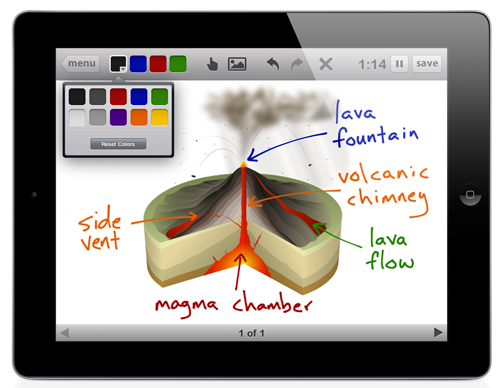
1. Educreations by Educreations Inc This app works like a whiteboard. It allows students or you to record a lesson and play it back.
 2. Thinking Blocks by Math Playground This app uses common core methods for addition, multiplication, fractions and ratios. Students use "part" and "whole" thinking to construct a model of problem.
3. Bluster This game allows two players to compete against each other to find rhyming words, prefixes, synonyms, antonyms and more. Has several levels and options.

4. Please Touch The Exhibit by Melbourne Museum This is a virtual library visit. Lots of visuals and information.

5. NASA- This app lets kids see videos, check on missions, see the latest news and more!

6. The Opposities by Mindshapes Limited This app lets students find antonyms and increase their vocabulary.

7. Chicktionary by Soap This is a boogle type game where students get a set of letters and try to make as many words as they can with the letters.
Top Paid Apps
 1. Keynote - by Apple $9.99 This is the equivalent of MS Powerpoint, but it is very user friendly and allows for use of graphics and fun transitions. My students love it.
2. Pages by Apple $9.99 This product is comparable to MS Word but also allows for easy manipulation of graphics and text.

3. Analogies for Kids by Nth Fusion $0.99
This app starts out comparing shapes and moves on to word and equation analogies.

4. Math vs Zombies by Tap to Learn $4.99 This app allows kids to race to turn zombies back into kids by answering the math question above their head. Has all 4 operations and levels of difficulty can be increased.

5. Stack the States - by Freecloud Design $0.99 This app lets students answer a question about a state and then stack them up to win. You can also buy Stack the Countries.

6. Imovie by Apple $4.99 Endless uses for this app. Create, edit, present student made videos.
*There are many notable apps that require a subscription, such as Spelling City, Time For Kids, and IXL. I recommend all of them but they do require you subscribe to a website.
**There are many, many more apps, such as Glow Draw, PBS Kids, NOVA, Textropolis and Geopop. but the ones listed above are the ones we use most often in class.

No comments:
Post a Comment
Note: Only a member of this blog may post a comment.